

Pick a format
When you start a design, the New design dropdown offers six presets, each with its pixel size.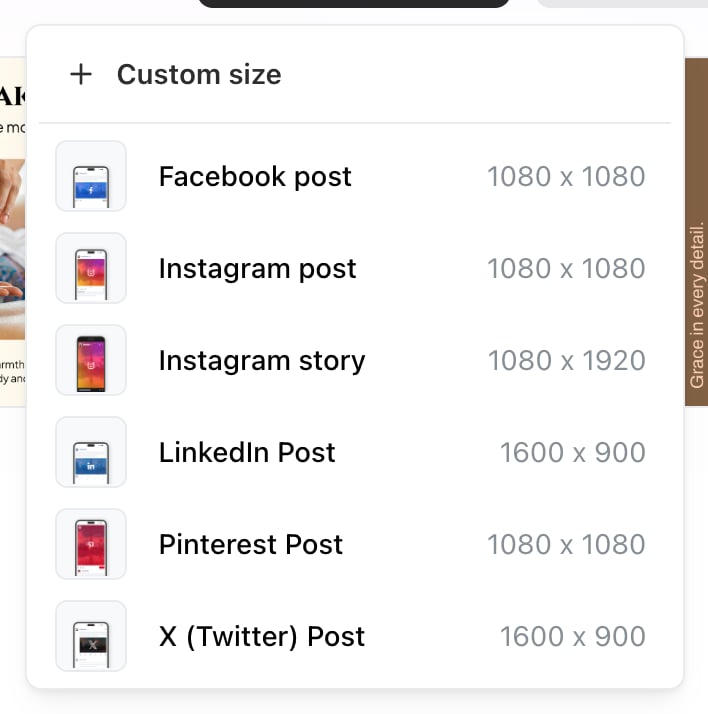
The New design menu. Each format shows its pixel dimensions, and Custom size takes a width and height of your own.
Custom size, at the top of the same menu, takes a width and height of your own. Both have to be between 100 and 2000 pixels — outside that Studio refuses with Width must be between 100 and 2000 pixels.
Picking the right one first is worth the two seconds. A design made square and then used as a story either gets bars around it or gets cropped.
Which to choose
The general rule on phones: vertical fills more screen than square, and square fills more than landscape. The 1600 × 900 presets are the safe choice only when the same image has to work on a desktop feed too.
Shapes the networks will crop
Instagram accepts a limited range and crops anything outside it — landscape at 1.91:1 and portrait at 4:5. A design made at another shape gets cropped to fit, and Instagram decides what survives. If a crop took something you needed, design at the right shape rather than fixing it afterwards. See Character and media limits.One design, several networks
There’s no automatic resize between formats. For the same content in two shapes, the practical route is to finish one, duplicate the design, and rebuild the layout at the other size — text that fits a landscape banner rarely fits a story without moving. If you only have time for one, a story-shaped design travels furthest: it works as a story, as a Reel cover, and croppable to portrait.Related
Studio's design tools
What the editor can do once the canvas is set.
Reels and Stories
Where vertical designs get used.