

Where to find your balance
Your remaining credits are shown at the bottom of the left sidebar, on every page.
The credit balance sits at the bottom of the sidebar, with a bar showing how much of your allowance is left.
What uses a credit
Each AI action costs 1 credit. Ocoya shows the cost on the button before you run it, so you always know what an action will spend.
A workflow run is the one non-AI action that costs a credit. It costs one whether or not the run ends up producing a post.
Costs add up within a single action
An AI post is one caption plus however many images you asked for. With image generation switched off, generating a post costs 1 credit: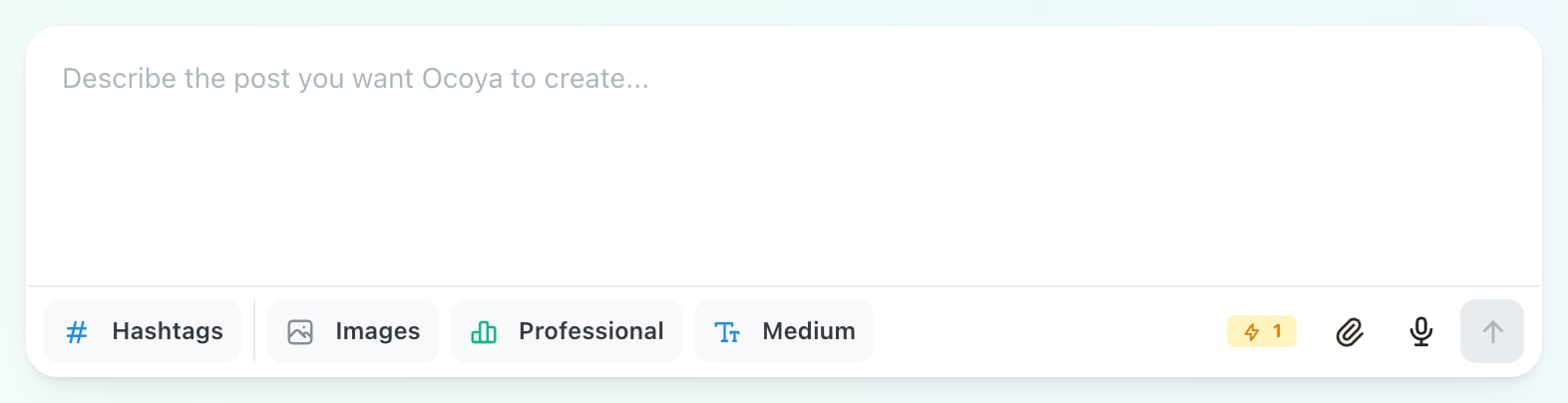
With image generation off, the cost badge in the composer toolbar shows 1 credit.

With one image switched on, the button reads Images (1) and the cost badge rises to 2 credits.
The cost badge always shows the total for the action you are about to run. If the number looks higher than you expected, check how many images or posts are selected.
How many credits you get
Your allowance depends on your plan. You can see it on any plan card under Settings → Billing.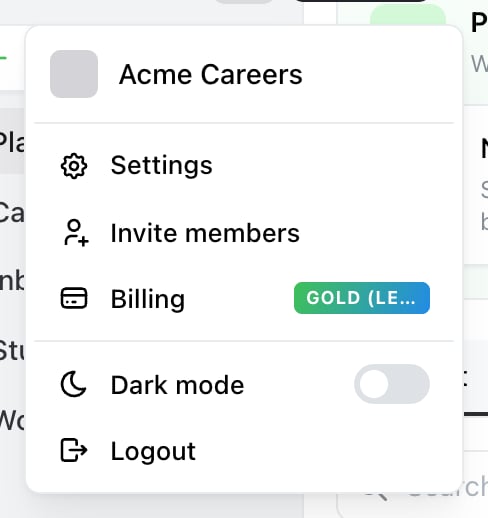
Where Billing lives: the account menu, behind the avatar at the top of the sidebar. The badge shows your current plan.

Each plan card lists its credit allowance alongside user and channel limits.
Legacy plans
If you joined Ocoya before the current plans, you may be on one of these. They keep working, and your billing page shows a Legacy badge next to the plan name.
Accounts without a paid subscription have no credits and cannot use AI features. Start a plan to get an allowance.
When credits reset
Credits refill every month, on every plan. Unused credits do not carry over — each month starts at your full allowance regardless of how many you used or didn’t use. Your reset day is the day of the month you subscribed. If you started your plan on the 12th, your credits refill on the 12th of each month.This is true whether you pay monthly or yearly. Paying annually doesn’t give you a year’s credits in one lump — you get your plan’s allowance every month, the same as a monthly subscriber.
Credits are shared across your brands
This surprises people, so it’s worth being clear: credits belong to you as the account owner, not to each brand separately. If you own more than one brand, they all draw from the same balance. Generating 50 posts in one brand leaves 50 fewer credits for every other brand you own. The number in the sidebar is your total remaining across all of them. Brands owned by someone else — for example a client’s brand you were invited into — use that owner’s credits, not yours.When you run out
Once your balance reaches zero, AI actions stop and Ocoya shows:You’ve exceeded the credit limit. Upgrade to get more.Everything that doesn’t use AI keeps working normally. Your scheduled posts still publish, your automations still trigger their non-AI steps, and you can still create and schedule posts by hand. You have two ways forward:
- Wait for the reset. Your allowance refills on your monthly reset day.
- Upgrade your plan. A higher plan gives a larger allowance, available immediately. Go to Settings → Billing and choose a plan.
Making credits go further
- Switch image generation off when you only need a caption. That halves the cost of each post.
- Generate a campaign once and edit the posts by hand, rather than regenerating the whole campaign.
- Check the number of images selected before generating — each one costs a credit, whether or not you end up using it.
- Turn off automations you aren’t relying on. Every run costs a credit, including runs that produce a post you don’t publish.
Related
Contact support
Balance looks wrong, or credits disappeared faster than expected? Message the Ocoya team from inside the app.