

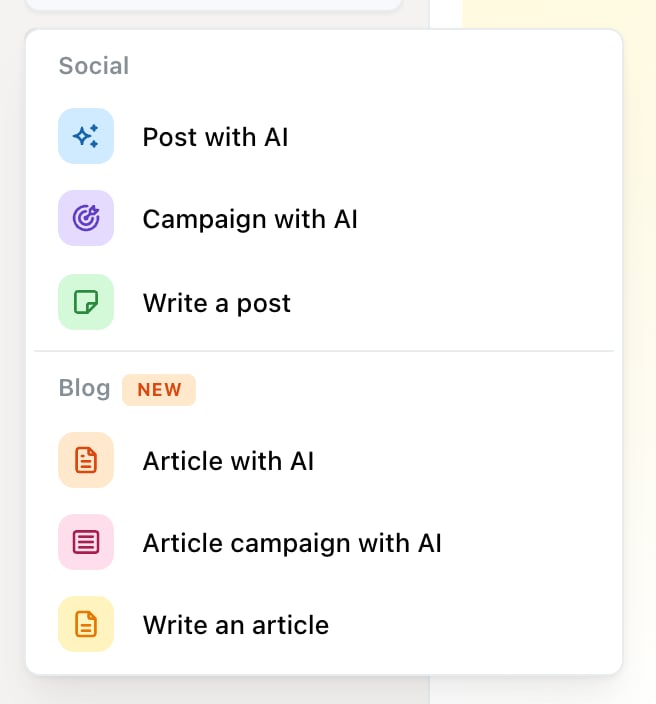
The Create new menu: Post with AI, Campaign with AI and Write a post under Social, and the same three for blog articles.
Scheduling and publishing never cost credits. Only the generating does. See What are credits?
If you haven’t made any posts yet, Planner opens on a start card instead: one Create a post with AI button and a row of ready-made ideas for social posts and blog articles. Pick an idea and the AI post composer opens with it filled in.
Post with AI
Describe the post and Ocoya drafts it. The prompt field reads Describe the post you want Ocoya to create…, and the toolbar underneath controls what comes back:- Hashtags — generate hashtags alongside the caption
- Images — generate images, and how many
- Professional — the tone of voice
- Medium — the length
Output quality depends heavily on your brand profile — the AI writes from your brand description. If captions come back generic, that’s the first thing to fix. See Set up your brand.
Campaign with AI
You describe the campaign instead of a single post, and the toolbar carries extra controls on a second row: the campaign goal, how many posts, how many days to spread them over, and which channels to use. Who it is for and how it should sound go in the prompt itself. The cost badge works the same way but multiplies. A campaign of 5 posts with one image each costs 10 credits — five captions plus five images. Ocoya shows that total before you generate. You review the generated plan before anything is scheduled, so a campaign you don’t like costs credits but doesn’t post anything.Write a post
A blank editor. You pick the channels, write the caption, add media and choose a time. Use this when you already know what you want to say, when you’re working from copy someone else wrote, or when the post is short enough that describing it to an AI would take longer than typing it. The editor still has AI in it — you can select any part of your caption and rewrite it. See Edit a caption with AI.Which to use
Write it yourself when you know the message. Use an AI post when you know the topic but not the words. Use a campaign when you need a run of posts around one theme and would otherwise write them one at a time. If you’re unsure, start with a single AI post. It costs a credit or two and tells you quickly whether your brand profile is giving the AI enough to work with.Related
Edit a caption with AI
Rewriting, shortening and translating text you’ve already written.
Post score
What the number next to your caption is measuring.