

Disconnect
Open Channels, select the ⋯ menu on the channel, and choose Disconnect.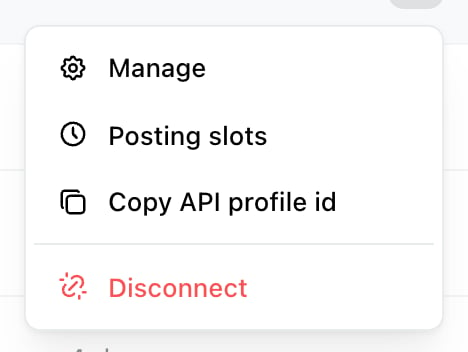
The ⋯ menu on a channel row. Disconnect sits below a divider, apart from the rest.
Disconnect [channel name]? You can reconnect it later.
What stops
- Publishing. Scheduled posts to that channel will not go out.
- Inbox. For Facebook and Instagram, its conversations stop arriving.
- Workflows. Any workflow whose trigger or action used that channel stops working.
What stays
Your posting history stays. Posts already published, and the record of what went out and when, remain in the brand. Disconnecting is not a way to clear history. Posts on the network stay. Anything Ocoya already published is a normal post on your account and is unaffected. To remove it, delete it on the network. The channel doesn’t count against your limit any more, so a disconnected channel frees a slot.Reconnecting later
Reconnecting the same account attaches it back to the brand rather than creating a duplicate. See Reconnect a channel, which is also what to do when a channel has simply expired rather than being deliberately removed. If you’re disconnecting because posts are failing, reconnecting is usually what you actually want — see Why didn’t my post publish?Revoking access properly
This is the part people miss. Disconnecting in Ocoya removes the channel from your brand. To be certain Ocoya can no longer reach the account at all, also remove Ocoya from the network’s own connected-apps settings:
Doing it there is what actually invalidates the access the network issued. It’s worth doing whenever an account is leaving your control — a client relationship ending, or someone leaving the team.
Bluesky is different: it’s connected with an app password rather than an approval. Revoke it by deleting that app password in your Bluesky settings.
Related
What Ocoya stores
What a connection holds in the first place.
Reconnect a channel
When access lapsed rather than you removing it.