

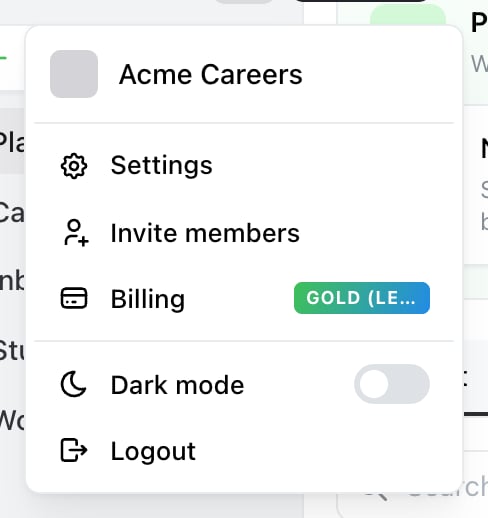
Start here. The account menu is the avatar at the top of the sidebar — Settings, then MCP in the settings sidebar.

Settings → MCP. Pick your tool, copy the snippet, and approve access when Ocoya opens.
Connect a tool
Pick your tool from the tabs — Claude, ChatGPT, Codex or VS Code — and Ocoya shows the exact snippet for it. Claude has its own sub-tabs for Claude Code, Claude Desktop / Web and a raw JSON config. Copy the snippet, run or paste it where the tool expects, and Ocoya opens in your browser to approve the connection. Sign-in and brand approval are handled by OAuth — you don’t create or paste an API token for this. Step-by-step guides for each tool live in the MCP documentation.Approving access
When the tool connects, Ocoya shows a consent screen with Requested permissions and Select brands to allow. Choosing brands here is the real decision. Unlike an API token — which always reaches every brand you own — an MCP connection is scoped to the brands you tick. If you run client brands, grant only the ones that tool should touch.What a connected tool can do
The tools are grouped as Publishing, Campaigns, Planning, Creative assets, Profiles, Workflows and Brands — roughly matching what you can do in the app yourself. Anything that costs credits in Ocoya costs credits through MCP too. An assistant generating ten posts spends the same as you generating ten posts. See What are credits? The full tool list is in the MCP documentation.Managing connections
The MCP panel lists every connected tool with when it was connected, when its access expires, and which brands it can reach. Revoke access disconnects one immediately. Do that when you stop using a tool, when a connection covers brands it shouldn’t, or if a machine you connected from is no longer yours. The MCP usage chart shows authenticated MCP requests for the current brand over the last hour, day or 30 days — useful for confirming a connection works, or noticing one that’s busier than expected.API token or MCP?
They’re separate mechanisms. Connecting a tool over MCP doesn’t need a token, and a token doesn’t grant MCP access.
Related
MCP documentation
Per-tool setup guides and the full tool reference.
API tokens
For your own code, rather than an assistant.