

Use it
Select some text in the caption, then open the menu with the + button beside it and choose an action. Ocoya replaces the selection with what it returns — the rest of the caption is untouched. Each action costs 1 credit. See What are credits?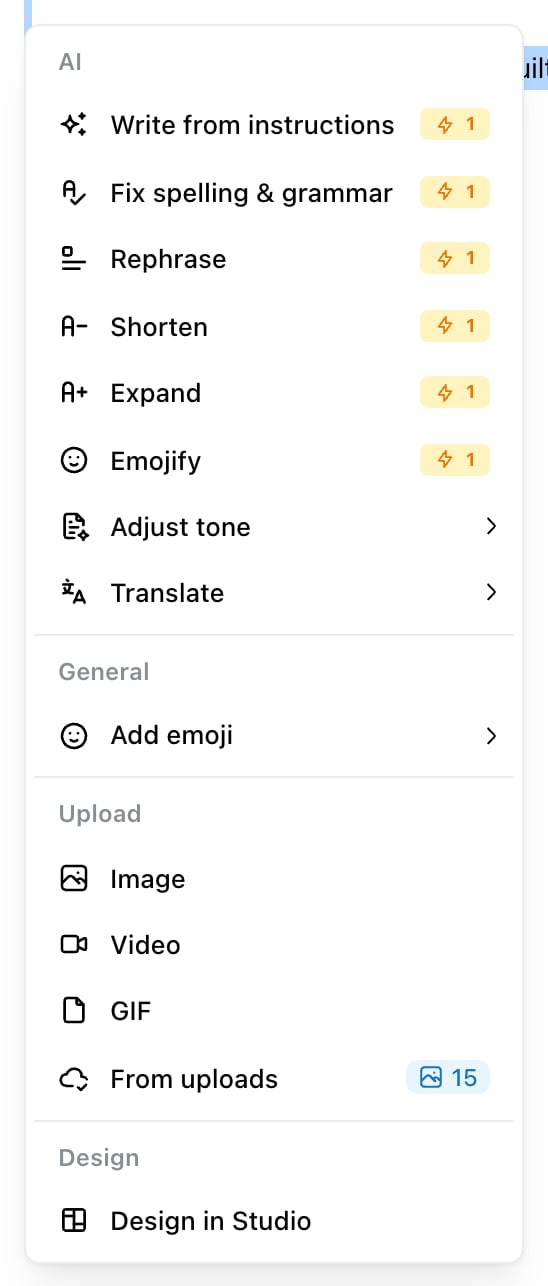
The AI actions, with text selected. Adjust tone and Translate open submenus; every action costs 1 credit.
The actions
Write from instructions is the one people miss. Instead of selecting a sentence to improve, you type what you want — one instruction per line — select those lines, and Ocoya writes a caption section for each one, in order. It’s the fastest way to get structure into a long caption.
Translating a caption
Translate sits in its own submenu with the language list. Ocoya detects the language your caption is already in — the editor shows it next to the post score — so the language you’re translating from doesn’t need choosing. A common pattern for multi-market brands: write the caption once, then use per-channel captions to hold a translated version for each market’s channel, rather than creating a separate post per language.Fixing what the post score flags
The AI menu also carries a Fix action for each failing item on your post score, labelled after the item — Fix: Opening line gives people a reason to stop, and so on. These are narrower than the general actions: each one is told to change only what that check measures and to leave everything else verbatim. See Post score for what each check looks at.When it doesn’t help
AI editing works on wording. It cannot fix a caption that has nothing to say — expanding a thin sentence gives you a longer thin sentence. It also writes from your brand description, so if the tone comes back wrong across every action rather than on one, the brand profile is the thing to change. See Set up your brand.Related
Ways to create a post
Writing by hand, drafting from a prompt, or generating a campaign.
What are credits?
Each AI edit costs one.