

Label a post
Open the post and use its Labels control — the tag icon in the editor’s top right, or ⌘ L.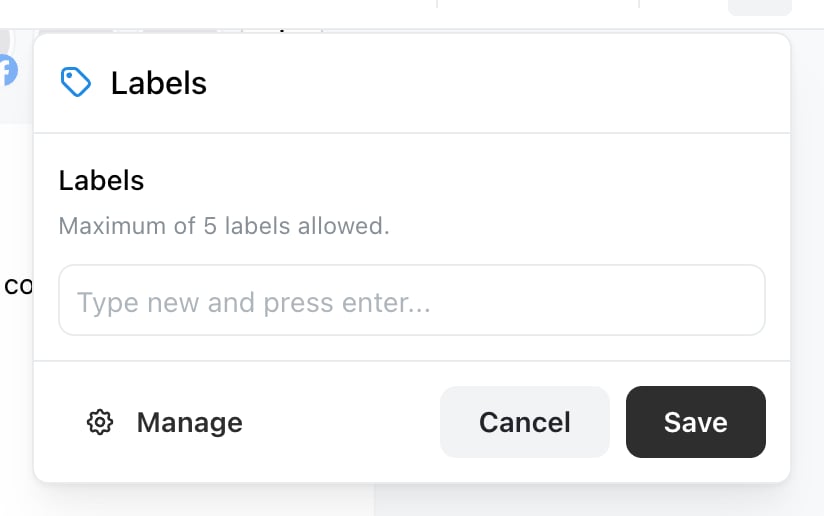
The Labels panel. Pick from existing labels, or type a new one and press Enter.
A post can carry a maximum of 5 labels. The panel says so above the input, and stops offering more once you reach it.
Create or edit a label
Manage, at the bottom left of the same panel, swaps it for the label manager without closing the post. There you can add a New label, Edit an existing one or Delete one. A label needs:- A name — between 2 and 30 characters. Shorter or longer and Ocoya refuses with Name must be between 2 and 30 characters
- A colour — chosen from the colour list
What to label
Labels earn their keep when the name answers a question you actually ask later. Some that work:- Campaign — Spring launch, Black Friday — so you can pull up everything from one push
- Content type — Product, Behind the scenes, Recruiting
- Client or account, if you run several inside one brand
- Status of your own — Needs photo, Legal reviewed — for stages Ocoya’s own post statuses don’t cover
Deleting a label
If you only want to stop using a label going forward, leaving it in place costs nothing.Labels are per brand
Each brand keeps its own labels. Running the same scheme across several brands means creating it in each — there’s no way to copy a set between them. If you’re an agency, it’s worth agreeing the scheme before you set up the second brand, because renaming labels across ten brands later is tedious.Related
Hashtag libraries
The tags that do get published.
The post editor
Where labels, hashtags and notes live.