

1
Create the brand
From the brand switcher at the top of the sidebar, New brand. Name it after the client. See Create, switch and delete brands.
2
Set the time zone first
New brands start on UTC. Set it to the client’s zone before anything is scheduled — changing it later doesn’t move posts you’ve already scheduled, it reinterprets them. See Time zones and scheduling.
3
Fill in the brand profile
Website, description, logos and colours. Fetch brand reads the client’s site and drafts most of it.Do this before generating anything. The description is what the AI writes from, so a thin one now means rewriting captions all month. See Set up your brand.
4
Connect their channels
Sign in as the account that administers each page or profile — not your own personal account. This is where agency setups most often go wrong, and it fails quietly: the connection completes and simply finds no profiles. See Connect a social channel.
5
Set posting slots
Give each channel the weekly times that suit that client, so scheduling is a choice from a plan rather than a decision each time. See Posting slots.
6
Invite the client
On the Client role. They can approve posts, comment, connect their own channels and see analytics, but can’t create or edit content — which is usually exactly the arrangement you want. See Roles and permissions.
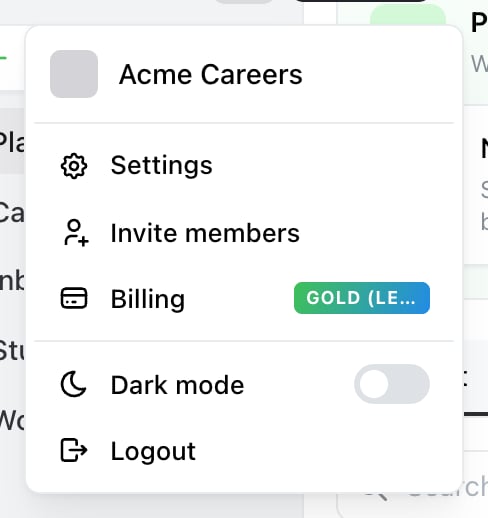
Where Team lives: the account menu, behind the avatar at the top of the sidebar. Invite members goes straight to it.

Settings → Team. Invite adds someone to this brand, and each member carries a role.
Decide how they’ll sign off
Two options, and it’s worth agreeing which before the first post: Approvals. Send posts for sign-off and they approve or reject in Ocoya. Rejected posts drop back to draft and lose their scheduled time, so build in a buffer. See Post approvals. A read-only calendar. If they don’t want an account, turn on a public calendar link and send it. They see what’s coming without logging in.What’s shared and what isn’t
The credit balance matters when you’re busy: every brand you own draws from the same pool, so a heavy month on one client leaves fewer credits for the rest. See What are credits?
Labels and hashtag libraries don’t copy between brands, so if you use the same scheme for every client, agree it before the second brand rather than the tenth.
When the relationship ends
Don’t delete the brand if you might need the history — deleting removes its posts and members. Options in order of reversibility: leave the brand, remove the other members, or move the channels to the client’s own Ocoya account by reconnecting them there. See Move a channel to another brand. Either way, have the client revoke Ocoya at each network if the accounts are theirs. See Disconnect a channel.Related
Roles and permissions
Why Client is the role for the client.
Brands and channels
What belongs to a brand.