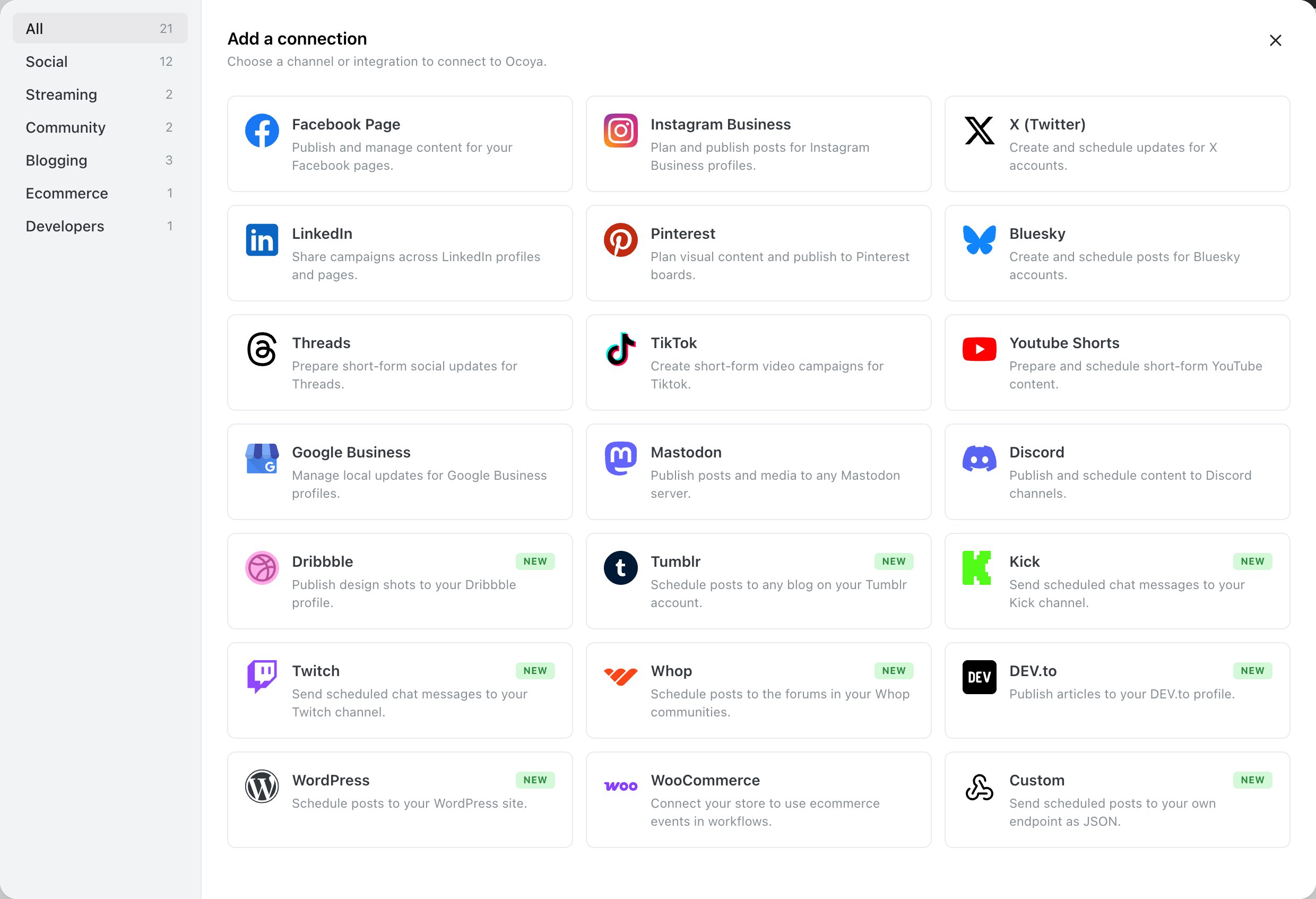
Connect Bluesky with an app password, what you can post, and its limits.
Bluesky is the one network that doesn’t use a sign-in page. You connect it with your handle and an app password — a separate password you generate in Bluesky, which you can revoke at any time without changing your account password.
Generate an app password in Bluesky under Settings → App passwords. It looks like xxxx-xxxx-xxxx-xxxx.Never enter your account password. Ocoya asks for an app password specifically so it never holds full access to your account.
2 MB per image is the tightest image limit of any network Ocoya supports. A photo straight off a phone is usually larger, so compress before uploading if Bluesky rejects it.
Bluesky holds 300 characters per post. Above that, Ocoya splits your caption into a thread rather than refusing it, up to 5,000 characters total. See Long posts and threads.
“Could not connect Bluesky.” Almost always the account password rather than an app password, or a typo in the handle. Generate a fresh app password and try again.“It worked, then stopped.” Revoking the app password in Bluesky disconnects Ocoya. Generate a new one and reconnect — see Reconnect a channel.“My video won’t attach.” Bluesky publishing is image-only in Ocoya. Post the video to another channel, or share a link.
Restoring access after an app password is revoked.
⌘I
{"docsConfig":{"theme":"almond","$schema":"https://mintlify.com/docs.json","name":"Ocoya API Docs","colors":{"primary":"#009689","light":"#009689","dark":"#009689"},"logo":{"light":"https://mintcdn.com/ocoya/ozMkI-5VuttqBG2a/images/logo-black.svg?fit=max\u0026auto=format\u0026n=ozMkI-5VuttqBG2a\u0026q=85\u0026s=d99168759950c8b7bee484fda796349b","dark":"https://mintcdn.com/ocoya/ozMkI-5VuttqBG2a/images/logo-white.svg?fit=max\u0026auto=format\u0026n=ozMkI-5VuttqBG2a\u0026q=85\u0026s=aef7a48ea92893cfa3fb4eecb6b9f85a","href":"https://www.app.ocoya.com/"},"favicon":"https://mintcdn.com/ocoya/ozMkI-5VuttqBG2a/images/favicon.svg?fit=max\u0026auto=format\u0026n=ozMkI-5VuttqBG2a\u0026q=85\u0026s=4b8a7c830c3d60549ceec65246a61f3b","api":{"openapi":{"source":"openapi.yaml","directory":"api-reference"},"params":{"expanded":"all"},"playground":{"display":"interactive","proxy":true},"examples":{"defaults":"required","languages":["curl","javascript","python","php","ruby"],"prefill":true,"autogenerate":true},"url":"full"},"navbar":{"links":[{"href":"https://www.app.ocoya.com/?modal=support","label":"Support"}]},"icons":{"library":"lucide"},"contextual":{"options":["chatgpt","claude","perplexity"],"display":"header"},"styling":{"latex":true},"navigation":{"pages":[]}},"deployment":{"deploymentMetadataValue":{"subdomain":"ocoya","hasAudioNarration":false,"actualSubdomain":"ocoya","customDomains":["docs.ocoya.com"],"gitSource":{"type":"github","owner":"ocoya","repo":"ocoya","deployBranch":"main","contentDirectory":"apps/ocoya-web/docs","isPrivate":true,"mountPath":"","label":""},"chroma":{"collectionId":"15af3331-7c2d-4be1-8995-92ec78d70e5d","liveDeploymentHistoryId":"6ad6a133304f57e382fbd99d","schemaVersion":"v3","latestBuiltDeploymentHistoryId":"6ad6a133304f57e382fbd99d"},"entitlements":{},"buildId":"6ad6a133304f57e382fbd99d","clientVersion":"0.0.3926","searchFilterCounts":[{"language":"default","tag":"Help center","count":111},{"language":"default","tag":"Channels","count":34},{"language":"default","tag":"MCP","count":30},{"language":"default","tag":"Creating content","count":26},{"language":"default","tag":"By network","count":26},{"language":"default","tag":"REST API","count":22},{"language":"default","tag":"Tools","count":21},{"language":"default","tag":"API Reference","count":15},{"language":"default","tag":"Get Started","count":12},{"language":"default","tag":"Get started","count":9}]},"assistantConfig":{"enableAskAiButton":false,"enableStarterQuestions":false,"enableContextualStarterQuestions":false,"enableAskAiSearchBar":true},"hasChatPermissions":false,"hasWebMcpPermissions":false,"toggles":[{"name":"kill-isr","enabled":true,"variant":{"name":"disabled","enabled":false,"feature_enabled":true},"impressionData":false},{"name":"agent-mintlify-slack","enabled":true,"variant":{"name":"disabled","enabled":false,"feature_enabled":true},"impressionData":false},{"name":"editor-v7-file-tree","enabled":true,"variant":{"name":"disabled","enabled":false,"feature_enabled":true},"impressionData":false},{"name":"agent-integrations-settings","enabled":true,"variant":{"name":"disabled","enabled":false,"feature_enabled":true},"impressionData":false},{"name":"automations-pr-grouping","enabled":true,"variant":{"name":"disabled","enabled":false,"feature_enabled":true},"impressionData":false},{"name":"custom-prefix","enabled":true,"variant":{"name":"disabled","enabled":false,"feature_enabled":true},"impressionData":false},{"name":"analytics-v7","enabled":true,"variant":{"name":"disabled","enabled":false,"feature_enabled":true},"impressionData":false},{"name":"user-flows-analytics","enabled":true,"variant":{"name":"disabled","enabled":false,"feature_enabled":true},"impressionData":false},{"name":"no-publish-flow","enabled":true,"variant":{"name":"disabled","enabled":false,"feature_enabled":true},"impressionData":false},{"name":"workos-onboarding","enabled":true,"variant":{"name":"disabled","enabled":false,"feature_enabled":true},"impressionData":false},{"name":"llms-txt-v2","enabled":true,"variant":{"name":"disabled","enabled":false,"feature_enabled":true},"impressionData":false},{"name":"pause-universal-search-reconcile","enabled":true,"variant":{"name":"disabled","enabled":false,"feature_enabled":true},"impressionData":false},{"name":"snapshot-serving-live","enabled":true,"variant":{"name":"disabled","enabled":false,"feature_enabled":true},"impressionData":false},{"name":"stripTemperatureMiddleware","enabled":true,"variant":{"name":"disabled","enabled":false,"feature_enabled":true},"impressionData":false},{"name":"per-site-search-delta","enabled":true,"variant":{"name":"disabled","enabled":false,"feature_enabled":true},"impressionData":false},{"name":"support-platform-pylon-zendesk","enabled":true,"variant":{"name":"disabled","enabled":false,"feature_enabled":true},"impressionData":false},{"name":"snapshot-serving","enabled":true,"variant":{"name":"disabled","enabled":false,"feature_enabled":true},"impressionData":false},{"name":"instant-rollback","enabled":true,"variant":{"name":"disabled","enabled":false,"feature_enabled":true},"impressionData":false},{"name":"granular-notifications-server","enabled":true,"variant":{"name":"disabled","enabled":false,"feature_enabled":true},"impressionData":false},{"name":"granular-notifications","enabled":true,"variant":{"name":"disabled","enabled":false,"feature_enabled":true},"impressionData":false},{"name":"editor-private-page-search","enabled":true,"variant":{"name":"disabled","enabled":false,"feature_enabled":true},"impressionData":false},{"name":"automations-fable","enabled":true,"variant":{"name":"disabled","enabled":false,"feature_enabled":true},"impressionData":false},{"name":"fixed-ai-action-pricing","enabled":true,"variant":{"name":"disabled","enabled":false,"feature_enabled":true},"impressionData":false},{"name":"automation-resolve-merge-conflict","enabled":true,"variant":{"name":"disabled","enabled":false,"feature_enabled":true},"impressionData":false},{"name":"scoped-publishing","enabled":true,"variant":{"name":"disabled","enabled":false,"feature_enabled":true},"impressionData":false},{"name":"mintql","enabled":true,"variant":{"name":"disabled","enabled":false,"feature_enabled":true},"impressionData":false},{"name":"page-level-analytics","enabled":true,"variant":{"name":"disabled","enabled":false,"feature_enabled":true},"impressionData":false},{"name":"editor-version-history-v2","enabled":true,"variant":{"name":"disabled","enabled":false,"feature_enabled":true},"impressionData":false},{"name":"editor-nav-generations","enabled":true,"variant":{"name":"disabled","enabled":false,"feature_enabled":true},"impressionData":false},{"name":"billing-page-v2","enabled":true,"variant":{"name":"disabled","enabled":false,"feature_enabled":true},"impressionData":false},{"name":"vite-origin","enabled":true,"variant":{"name":"disabled","enabled":false,"feature_enabled":true},"impressionData":false},{"name":"workspace-projects","enabled":true,"variant":{"name":"disabled","enabled":false,"feature_enabled":true},"impressionData":false},{"name":"assistant-v5","enabled":true,"variant":{"name":"disabled","enabled":false,"feature_enabled":true},"impressionData":false},{"name":"byok-sep-25","enabled":true,"variant":{"name":"disabled","enabled":false,"feature_enabled":true},"impressionData":false},{"name":"fork-pr-previews","enabled":true,"variant":{"name":"disabled","enabled":false,"feature_enabled":true},"impressionData":false},{"name":"revalidation-jwt","enabled":true,"variant":{"name":"disabled","enabled":false,"feature_enabled":true},"impressionData":false},{"name":"editor-agent-model-picker","enabled":true,"variant":{"name":"disabled","enabled":false,"feature_enabled":true},"impressionData":false},{"name":"hobby-abuse-scan","enabled":true,"variant":{"name":"disabled","enabled":false,"feature_enabled":true},"impressionData":false},{"name":"dashboard-inbox","enabled":true,"variant":{"name":"disabled","enabled":false,"feature_enabled":true},"impressionData":false}],"isAtlas":false,"googleFontsInlined":true},"customCss":[{"filePath":"style.css","content":"#navbar a[href=\"https://www.app.ocoya.com/\"] img,[data-component-part=navbar-logo] img{height:18px!important;max-height:18px!important;width:auto!important;max-width:132px!important;object-fit:contain}#navbar a[href=\"https://www.app.ocoya.com/?modal=support\"],[data-component-part=navbar-link][href=\"https://www.app.ocoya.com/?modal=support\"]{color:#52525b;font-weight:500;text-decoration:none}#navbar a[href=\"https://www.app.ocoya.com/?modal=support\"]:focus,#navbar a[href=\"https://www.app.ocoya.com/?modal=support\"]:hover,[data-component-part=navbar-link][href=\"https://www.app.ocoya.com/?modal=support\"]:focus,[data-component-part=navbar-link][href=\"https://www.app.ocoya.com/?modal=support\"]:hover{color:#27272a}.ocoya-docs-button{align-items:center;background:#009689;border:1px solid transparent;border-radius:.5rem;box-sizing:border-box;color:#fff;display:inline-flex;font-size:.875rem;font-weight:600;gap:.5rem;height:2.25rem;line-height:1.25rem;margin:.25rem 0 1.25rem;padding:.5rem .875rem;text-decoration:none;transition:background-color 120ms ease,color 120ms ease;vertical-align:top}.ocoya-docs-button:focus,.ocoya-docs-button:hover{background:#008579;border-color:transparent;color:#fff;text-decoration:none}"}],"page":{"pagePath":"help/channels/bluesky","slug":"/help/channels/bluesky","pageMetadata":{"title":"Bluesky","description":"Connect Bluesky with an app password, what you can post, and its limits.","icon":"cloud","intercom":{"external_id":"channel-bluesky","ai_agent_availability":true,"ai_copilot_availability":true},"href":"/help/channels/bluesky"},"description":{"compiledSource":"\"use strict\";\nconst {jsx: _jsx} = arguments[0];\nconst {useMDXComponents: _provideComponents} = arguments[0];\nfunction _createMdxContent(props) {\n const _components = {\n p: \"p\",\n ..._provideComponents(),\n ...props.components\n };\n return _jsx(_components.p, {\n children: \"Connect Bluesky with an app password, what you can post, and its limits.\"\n });\n}\nfunction MDXContent(props = {}) {\n const {wrapper: MDXLayout} = {\n ..._provideComponents(),\n ...props.components\n };\n return MDXLayout ? _jsx(MDXLayout, {\n ...props,\n children: _jsx(_createMdxContent, {\n ...props\n })\n }) : _createMdxContent(props);\n}\nreturn {\n default: MDXContent\n};\n","frontmatter":{},"scope":{}},"pageType":"default","mdx":{"mdxSource":{"compiledSource":"\"use strict\";const{Fragment:_Fragment,jsx:_jsx,jsxs:_jsxs}=arguments[0];const{useMDXComponents:_provideComponents}=arguments[0];function _createMdxContent(props){const _components={a:`a`,code:`code`,p:`p`,strong:`strong`,tbody:`tbody`,td:`td`,th:`th`,thead:`thead`,tr:`tr`,..._provideComponents(),...props.components},{Card,Columns,Frame,Heading,OptimizedImage,Step,Steps,Table}=_components;if(!Card)_missingMdxReference(`Card`,true);if(!Columns)_missingMdxReference(`Columns`,true);if(!Frame)_missingMdxReference(`Frame`,true);if(!Heading)_missingMdxReference(`Heading`,true);if(!OptimizedImage)_missingMdxReference(`OptimizedImage`,true);if(!Step)_missingMdxReference(`Step`,true);if(!Steps)_missingMdxReference(`Steps`,true);if(!Table)_missingMdxReference(`Table`,true);return _jsxs(_Fragment,{children:[_jsxs(_components.p,{children:[`Bluesky is the one network that doesn’t use a sign-in page. You connect it with your handle and an `,_jsx(_components.strong,{children:`app password`}),` — a separate password you generate in Bluesky, which you can revoke at any time without changing your account password.`]}),`\n`,_jsx(Heading,{level:`2`,id:`before-you-start`,children:`Before you start`}),`\n`,_jsxs(_components.p,{children:[`Generate an app password in Bluesky under `,_jsx(_components.strong,{children:`Settings → App passwords`}),`. It looks like `,_jsx(_components.code,{children:`xxxx-xxxx-xxxx-xxxx`}),`.`]}),`\n`,_jsx(_components.p,{children:`Never enter your account password. Ocoya asks for an app password specifically so it never holds full access to your account.`}),`\n`,_jsx(Heading,{level:`2`,id:`connect-bluesky`,children:`Connect Bluesky`}),`\n`,_jsxs(Steps,{children:[_jsx(Step,{title:`Open Channels`,children:_jsxs(_components.p,{children:[`Select `,_jsx(_components.strong,{children:`Channels`}),` in the left sidebar, then `,_jsx(_components.strong,{children:`Connect channel`}),`.`]})}),_jsxs(Step,{title:`Choose Bluesky`,children:[_jsxs(_components.p,{children:[`Pick `,_jsx(_components.strong,{children:`Bluesky`}),` from the `,_jsx(_components.strong,{children:`Add a connection`}),` panel.`]}),_jsx(Frame,{caption:`Bluesky in the Add a connection panel.`,children:_jsx(OptimizedImage,{src:`https://mintcdn.com/ocoya/aR2337cSP913XgQ7/images/screenshots/channels-connect-drawer.png?fit=max\u0026auto=format\u0026n=aR2337cSP913XgQ7\u0026q=85\u0026s=ba8896762ffdd1d46ab6276cc59f94b8`,alt:`Add a connection modal with a category sidebar on the left — All, Social, Streaming, Community, Blogging, Ecommerce and Developers, each with a count — and a grid of channel cards, each with its logo, name and a one-line description`,\"data-og-width\":`2480`,width:`2480`,\"data-og-height\":`1694`,height:`1694`,\"data-path\":`images/screenshots/channels-connect-drawer.png`,\"data-optimize\":`true`,\"data-opv\":`3`,srcset:`https://mintcdn.com/ocoya/aR2337cSP913XgQ7/images/screenshots/channels-connect-drawer.png?w=280\u0026fit=max\u0026auto=format\u0026n=aR2337cSP913XgQ7\u0026q=85\u0026s=90b0f5d8e1ac90e213ec9746ed4047a7 280w, https://mintcdn.com/ocoya/aR2337cSP913XgQ7/images/screenshots/channels-connect-drawer.png?w=560\u0026fit=max\u0026auto=format\u0026n=aR2337cSP913XgQ7\u0026q=85\u0026s=dd0e84597a8d3f6c1e4466c9988a96ae 560w, https://mintcdn.com/ocoya/aR2337cSP913XgQ7/images/screenshots/channels-connect-drawer.png?w=840\u0026fit=max\u0026auto=format\u0026n=aR2337cSP913XgQ7\u0026q=85\u0026s=ff78108e0ce2937084234aa03b476dd5 840w, https://mintcdn.com/ocoya/aR2337cSP913XgQ7/images/screenshots/channels-connect-drawer.png?w=1100\u0026fit=max\u0026auto=format\u0026n=aR2337cSP913XgQ7\u0026q=85\u0026s=7a714c9f6c5ca1979efbc82561a7c0e6 1100w, https://mintcdn.com/ocoya/aR2337cSP913XgQ7/images/screenshots/channels-connect-drawer.png?w=1650\u0026fit=max\u0026auto=format\u0026n=aR2337cSP913XgQ7\u0026q=85\u0026s=7d75988c59c53f88814375098be07846 1650w, https://mintcdn.com/ocoya/aR2337cSP913XgQ7/images/screenshots/channels-connect-drawer.png?w=2500\u0026fit=max\u0026auto=format\u0026n=aR2337cSP913XgQ7\u0026q=85\u0026s=66abf86c2b2949c79e57c536fe75f19a 2500w`})})]}),_jsx(Step,{title:`Enter your handle`,children:_jsxs(_components.p,{children:[`Your handle is under your display name on your Bluesky profile — usually `,_jsx(_components.code,{children:`yourname.bsky.social`}),`. Custom domain handles work too.`]})}),_jsx(Step,{title:`Paste the app password`,children:_jsxs(_components.p,{children:[`Paste the app password you generated, then select `,_jsx(_components.strong,{children:`Connect Bluesky`}),`.`]})})]}),`\n`,_jsxs(_components.p,{children:[`There’s also a `,_jsx(_components.strong,{children:`Follow us on Bluesky`}),` checkbox, ticked by default. Clear it if you’d rather not.`]}),`\n`,_jsx(Heading,{level:`2`,id:`what-you-can-post`,children:`What you can post`}),`\n`,_jsxs(Table,{children:[_jsx(_components.thead,{children:_jsxs(_components.tr,{children:[_jsx(_components.th,{children:`Post type`}),_jsx(_components.th,{children:`Supported`})]})}),_jsxs(_components.tbody,{children:[_jsxs(_components.tr,{children:[_jsx(_components.td,{children:`Text post`}),_jsx(_components.td,{children:`Yes — no image needed`})]}),_jsxs(_components.tr,{children:[_jsx(_components.td,{children:`Single image`}),_jsx(_components.td,{children:`Yes`})]}),_jsxs(_components.tr,{children:[_jsx(_components.td,{children:`Carousel`}),_jsx(_components.td,{children:`Yes — up to 4 images`})]}),_jsxs(_components.tr,{children:[_jsx(_components.td,{children:`Video`}),_jsx(_components.td,{children:`No`})]}),_jsxs(_components.tr,{children:[_jsx(_components.td,{children:`GIF`}),_jsx(_components.td,{children:`No`})]})]})]}),`\n`,_jsx(Heading,{level:`2`,id:`bluesky’s-limits`,children:`Bluesky’s limits`}),`\n`,_jsxs(Table,{children:[_jsx(_components.thead,{children:_jsxs(_components.tr,{children:[_jsx(_components.th,{}),_jsx(_components.th,{children:`Limit`})]})}),_jsxs(_components.tbody,{children:[_jsxs(_components.tr,{children:[_jsx(_components.td,{children:`Post text`}),_jsx(_components.td,{children:`300 characters per post, 5,000 total`})]}),_jsxs(_components.tr,{children:[_jsx(_components.td,{children:`Hashtags`}),_jsx(_components.td,{children:`No fixed limit`})]}),_jsxs(_components.tr,{children:[_jsx(_components.td,{children:`Images per post`}),_jsx(_components.td,{children:`4, maximum 2 MB each`})]}),_jsxs(_components.tr,{children:[_jsx(_components.td,{children:`Video`}),_jsx(_components.td,{children:`Not supported`})]})]})]}),`\n`,_jsxs(_components.p,{children:[_jsx(_components.strong,{children:`2 MB per image is the tightest image limit of any network Ocoya supports.`}),` A photo straight off a phone is usually larger, so compress before uploading if Bluesky rejects it.`]}),`\n`,_jsx(Heading,{level:`2`,id:`long-captions-become-threads`,children:`Long captions become threads`}),`\n`,_jsxs(_components.p,{children:[`Bluesky holds 300 characters per post. Above that, Ocoya splits your caption into a thread rather than refusing it, up to 5,000 characters total. See `,_jsx(_components.a,{href:`/help/long-posts-and-threads`,children:`Long posts and threads`}),`.`]}),`\n`,_jsx(Heading,{level:`2`,id:`common-problems`,children:`Common problems`}),`\n`,_jsxs(_components.p,{children:[_jsx(_components.strong,{children:`“Could not connect Bluesky.”`}),` Almost always the account password rather than an app password, or a typo in the handle. Generate a fresh app password and try again.`]}),`\n`,_jsxs(_components.p,{children:[_jsx(_components.strong,{children:`“It worked, then stopped.”`}),` Revoking the app password in Bluesky disconnects Ocoya. Generate a new one and reconnect — see `,_jsx(_components.a,{href:`/help/reconnect-a-channel`,children:`Reconnect a channel`}),`.`]}),`\n`,_jsxs(_components.p,{children:[_jsx(_components.strong,{children:`“My video won’t attach.”`}),` Bluesky publishing is image-only in Ocoya. Post the video to another channel, or share a link.`]}),`\n`,_jsx(Heading,{level:`2`,id:`related`,children:`Related`}),`\n`,_jsxs(Columns,{cols:2,children:[_jsx(Card,{title:`Long posts and threads`,icon:`list`,href:`/help/long-posts-and-threads`,children:_jsx(_components.p,{children:`When a caption is split into a chain of replies.`})}),_jsx(Card,{title:`Reconnect a channel`,icon:`refresh-cw`,href:`/help/reconnect-a-channel`,children:_jsx(_components.p,{children:`Restoring access after an app password is revoked.`})})]})]})}function MDXContent(props={}){const{wrapper:MDXLayout}={..._provideComponents(),...props.components};return MDXLayout?_jsx(MDXLayout,{...props,children:_jsx(_createMdxContent,{...props})}):_createMdxContent(props)}return{default:MDXContent};function _missingMdxReference(id,component){throw new Error(`Expected `+(component?`component`:`object`)+\" `\"+id+\"` to be defined: you likely forgot to import, pass, or provide it.\")}","frontmatter":{},"scope":{"config":{},"pageMetadata":{"title":"Bluesky","description":"Connect Bluesky with an app password, what you can post, and its limits.","icon":"cloud","intercom":{"external_id":"channel-bluesky","ai_agent_availability":true,"ai_copilot_availability":true},"href":"/help/channels/bluesky"}}},"mdxSourceWithNoJs":null},"mdxExtracts":{"tableOfContents":[{"title":"Before you start","slug":"before-you-start","depth":2,"children":[]},{"title":"Connect Bluesky","slug":"connect-bluesky","depth":2,"children":[]},{"title":"What you can post","slug":"what-you-can-post","depth":2,"children":[]},{"title":"Bluesky’s limits","slug":"bluesky’s-limits","depth":2,"children":[]},{"title":"Long captions become threads","slug":"long-captions-become-threads","depth":2,"children":[]},{"title":"Common problems","slug":"common-problems","depth":2,"children":[]},{"title":"Related","slug":"related","depth":2,"children":[]}],"codeExamples":{}},"jsLinks":[],"subdomain":"ocoya","siteName":"Ocoya API Docs","title":"Bluesky - Ocoya API Docs","navMaps":{"firstHrefInVersion":{},"firstHrefInLanguage":{}},"lastModified":"2026-09-22T22:19:12.050Z","originalFileLocation":"help/channels/bluesky.mdx"},"headHtml":"\u003cscript data-mint-head>(function(){var d=document.documentElement,p=null;if(!p){try{p=localStorage.getItem(\"isDarkMode\")}catch(e){}if(p==='true')p='dark';else if(p==='false')p='light';if(p!=='light'\u0026\u0026p!=='dark'\u0026\u0026p!=='system')p=\"system\"}var r=p==='system'?(matchMedia(\"(prefers-color-scheme: dark)\").matches?'dark':'light'):p;d.classList.remove(r==='dark'?'light':'dark');d.classList.add(r);d.setAttribute(\"data-theme-preference\",p)})();\u003c/script>\u003cmeta data-mint-head name=\"description\" content=\"Connect Bluesky with an app password, what you can post, and its limits.\">\u003cmeta data-mint-head name=\"application-name\" content=\"Ocoya API Docs\">\u003cmeta data-mint-head name=\"generator\" content=\"Mintlify\">\u003clink data-mint-head rel=\"icon\" type=\"image/png\" sizes=\"192x192\" href=\"/mintlify-assets/_mintlify/favicons/ocoya/-2RFwgjUU5UjQeFt/_generated/favicon/android-chrome-192x192.png\" media=\"(prefers-color-scheme: light)\">\u003clink data-mint-head rel=\"apple-touch-icon\" type=\"image/png\" sizes=\"180x180\" href=\"/mintlify-assets/_mintlify/favicons/ocoya/-2RFwgjUU5UjQeFt/_generated/favicon/apple-touch-icon.png\">\u003clink data-mint-head rel=\"icon\" type=\"image/png\" sizes=\"16x16\" href=\"/mintlify-assets/_mintlify/favicons/ocoya/-2RFwgjUU5UjQeFt/_generated/favicon/favicon-16x16.png\" media=\"(prefers-color-scheme: light)\">\u003clink data-mint-head rel=\"icon\" type=\"image/png\" sizes=\"32x32\" href=\"/mintlify-assets/_mintlify/favicons/ocoya/-2RFwgjUU5UjQeFt/_generated/favicon/favicon-32x32.png\" media=\"(prefers-color-scheme: light)\">\u003clink data-mint-head rel=\"shortcut icon\" type=\"image/x-icon\" href=\"/mintlify-assets/_mintlify/favicons/ocoya/-2RFwgjUU5UjQeFt/_generated/favicon/favicon.ico\" media=\"(prefers-color-scheme: light)\">\u003clink data-mint-head rel=\"icon\" type=\"image/png\" sizes=\"192x192\" href=\"/mintlify-assets/_mintlify/favicons/ocoya/-2RFwgjUU5UjQeFt/_generated/favicon-dark/android-chrome-192x192.png\" media=\"(prefers-color-scheme: dark)\">\u003clink data-mint-head rel=\"icon\" type=\"image/png\" sizes=\"16x16\" href=\"/mintlify-assets/_mintlify/favicons/ocoya/-2RFwgjUU5UjQeFt/_generated/favicon-dark/favicon-16x16.png\" media=\"(prefers-color-scheme: dark)\">\u003clink data-mint-head rel=\"icon\" type=\"image/png\" sizes=\"32x32\" href=\"/mintlify-assets/_mintlify/favicons/ocoya/-2RFwgjUU5UjQeFt/_generated/favicon-dark/favicon-32x32.png\" media=\"(prefers-color-scheme: dark)\">\u003clink data-mint-head rel=\"shortcut icon\" type=\"image/x-icon\" href=\"/mintlify-assets/_mintlify/favicons/ocoya/-2RFwgjUU5UjQeFt/_generated/favicon-dark/favicon.ico\" media=\"(prefers-color-scheme: dark)\">\u003cmeta data-mint-head property=\"og:title\" content=\"Bluesky - Ocoya API Docs\">\u003cmeta data-mint-head property=\"og:description\" content=\"Connect Bluesky with an app password, what you can post, and its limits.\">\u003cmeta data-mint-head property=\"og:site_name\" content=\"Ocoya API Docs\">\u003cmeta data-mint-head property=\"og:url\" content=\"https://docs.ocoya.com/help/channels/bluesky\">\u003cmeta data-mint-head property=\"og:type\" content=\"website\">\u003cmeta data-mint-head property=\"og:image\" content=\"https://ocoya.mintlify.app/_mintlify/api/og/v2?division=By+network\u0026amp;title=Bluesky\u0026amp;description=Connect+Bluesky+with+an+app+password%2C+what+you+can+post%2C+and+its+limits.\u0026amp;theme=3d52847fb2d63b5dd23982ec\u0026amp;signature=51344008ac51a499a645dba44b4a1a3547380b1faefefd979109ff6090b73133\">\u003cmeta data-mint-head property=\"og:image:width\" content=\"1200\">\u003cmeta data-mint-head property=\"og:image:height\" content=\"630\">\u003cmeta data-mint-head name=\"twitter:card\" content=\"summary_large_image\">\u003cmeta data-mint-head name=\"twitter:title\" content=\"Bluesky - Ocoya API Docs\">\u003cmeta data-mint-head name=\"twitter:description\" content=\"Connect Bluesky with an app password, what you can post, and its limits.\">\u003cmeta data-mint-head name=\"twitter:image\" content=\"https://ocoya.mintlify.app/_mintlify/api/og/v2?division=By+network\u0026amp;title=Bluesky\u0026amp;description=Connect+Bluesky+with+an+app+password%2C+what+you+can+post%2C+and+its+limits.\u0026amp;theme=3d52847fb2d63b5dd23982ec\u0026amp;signature=51344008ac51a499a645dba44b4a1a3547380b1faefefd979109ff6090b73133\">\u003cmeta data-mint-head name=\"twitter:image:width\" content=\"1200\">\u003cmeta data-mint-head name=\"twitter:image:height\" content=\"630\">\u003cmeta data-mint-head name=\"msapplication-config\" content=\"/mintlify-assets/_mintlify/favicons/ocoya/-2RFwgjUU5UjQeFt/_generated/favicon/browserconfig.xml\">\u003cmeta data-mint-head name=\"apple-mobile-web-app-title\" content=\"Ocoya API Docs\">\u003cmeta data-mint-head name=\"msapplication-TileColor\" content=\"#009689\">\u003clink data-mint-head rel=\"canonical\" href=\"https://docs.ocoya.com/help/channels/bluesky\">\u003clink data-mint-head rel=\"alternate\" type=\"application/xml\" href=\"/sitemap.xml\">\u003clink data-mint-head rel=\"alternate\" type=\"text/markdown\" href=\"/help/channels/bluesky.md\">\u003cscript data-mint-head type=\"application/ld+json\">{\"@context\":\"https://schema.org\",\"@graph\":[{\"@type\":\"Organization\",\"@id\":\"https://docs.ocoya.com/#organization\",\"name\":\"Ocoya API Docs\",\"url\":\"https://docs.ocoya.com\",\"logo\":{\"@type\":\"ImageObject\",\"url\":\"https://mintcdn.com/ocoya/ozMkI-5VuttqBG2a/images/logo-black.svg?fit=max\u0026auto=format\u0026n=ozMkI-5VuttqBG2a\u0026q=85\u0026s=d99168759950c8b7bee484fda796349b\"}},{\"@type\":\"WebSite\",\"@id\":\"https://docs.ocoya.com#website\",\"name\":\"Ocoya API Docs\",\"url\":\"https://docs.ocoya.com\",\"publisher\":{\"@id\":\"https://docs.ocoya.com/#organization\"}},{\"@type\":\"WebPage\",\"@id\":\"https://docs.ocoya.com/help/channels/bluesky#webpage\",\"url\":\"https://docs.ocoya.com/help/channels/bluesky\",\"name\":\"Bluesky\",\"description\":\"Connect Bluesky with an app password, what you can post, and its limits.\",\"dateModified\":\"2026-09-22T22:19:12.050Z\",\"isPartOf\":{\"@id\":\"https://docs.ocoya.com#website\"},\"breadcrumb\":{\"@id\":\"https://docs.ocoya.com/help/channels/bluesky#breadcrumb\"}},{\"@type\":\"BreadcrumbList\",\"@id\":\"https://docs.ocoya.com/help/channels/bluesky#breadcrumb\",\"itemListElement\":[{\"@type\":\"ListItem\",\"position\":1,\"name\":\"Channels\",\"item\":\"https://docs.ocoya.com/help/connect-a-channel\"},{\"@type\":\"ListItem\",\"position\":2,\"name\":\"By network\",\"item\":\"https://docs.ocoya.com/help/channels/facebook\"},{\"@type\":\"ListItem\",\"position\":3,\"name\":\"Bluesky\",\"item\":\"https://docs.ocoya.com/help/channels/bluesky\"}]},{\"@type\":[\"Article\",\"TechArticle\"],\"@id\":\"https://docs.ocoya.com/help/channels/bluesky#article\",\"headline\":\"Bluesky\",\"name\":\"Bluesky\",\"description\":\"Connect Bluesky with an app password, what you can post, and its limits.\",\"url\":\"https://docs.ocoya.com/help/channels/bluesky\",\"mainEntityOfPage\":{\"@id\":\"https://docs.ocoya.com/help/channels/bluesky#webpage\"},\"dateModified\":\"2026-09-22T22:19:12.050Z\",\"publisher\":{\"@id\":\"https://docs.ocoya.com/#organization\"},\"isPartOf\":{\"@id\":\"https://docs.ocoya.com#website\"}}]}\u003c/script>\u003cscript data-mint-head type=\"application/ld+json\">{\"@context\":\"https://schema.org\",\"@type\":\"WebSite\",\"name\":\"Ocoya API Docs\",\"creator\":{\"@type\":\"Organization\",\"name\":\"Mintlify\",\"url\":\"https://mintlify.com\"}}\u003c/script>","siteName":"Ocoya API Docs","nav":{"global":null,"tabs":[{"tab":"Help center","icon":"life-buoy","groups":[{"group":"Get started","icon":"rocket","pages":[{"title":"Ocoya help center","icon":"life-buoy","href":"/help"},{"title":"Ocoya terms","icon":"book-a","href":"/help/glossary"},{"title":"Setting up your first brand","icon":"rocket","href":"/help/set-up-first-brand"},{"title":"Log in to Ocoya","icon":"log-in","href":"/help/log-in-to-ocoya"},{"title":"Brands and channels","icon":"layers","href":"/help/brands-and-channels"},{"title":"Set up your brand","icon":"fingerprint","href":"/help/set-up-your-brand"},{"title":"Create and schedule your first post","icon":"pen-line","href":"/help/first-post"},{"title":"Switching to Ocoya from another tool","icon":"arrow-right-left","href":"/help/switching-to-ocoya"},{"title":"Install Ocoya on your phone or computer","icon":"smartphone","href":"/help/install-the-app"}]},{"group":"Channels","icon":"share-2","pages":[{"title":"Connect a social channel","icon":"share-2","href":"/help/connect-a-channel"},{"title":"Reconnect a channel","icon":"refresh-cw","href":"/help/reconnect-a-channel"},{"title":"Manage a channel","icon":"settings-2","href":"/help/manage-a-channel"},{"title":"Posting slots","icon":"clock-9","href":"/help/posting-slots"},{"title":"Move a channel to another brand","icon":"arrow-right-left","href":"/help/move-a-channel"},{"title":"Why can't I connect another channel?","icon":"circle-slash","href":"/help/channel-slots"},{"title":"TikTok publishing options","icon":"music","href":"/help/tiktok-options"},{"title":"Character and media limits","icon":"ruler","href":"/help/channel-limits"},{"group":"By network","icon":"globe","pages":[{"title":"Facebook Pages","icon":"facebook","href":"/help/channels/facebook"},{"title":"Instagram","icon":"instagram","href":"/help/channels/instagram"},{"title":"X (Twitter)","icon":"twitter","href":"/help/channels/x-twitter"},{"title":"LinkedIn","icon":"linkedin","href":"/help/channels/linkedin"},{"title":"Pinterest","description":"Connect Pinterest to Ocoya, choose a board, and the limits Pinterest applies.","icon":"image","href":"/help/channels/pinterest"},{"title":"Bluesky","icon":"cloud","href":"/help/channels/bluesky"},{"title":"Threads","description":"Connect a Threads profile, what you can post, and how long captions become threads.","icon":"at-sign","href":"/help/channels/threads"},{"title":"TikTok","icon":"music","href":"/help/channels/tiktok"},{"title":"YouTube Shorts","icon":"youtube","href":"/help/channels/youtube"},{"title":"Google Business","icon":"map-pin","href":"/help/channels/google-business"},{"title":"Mastodon","icon":"server","href":"/help/channels/mastodon"},{"title":"Telegram","icon":"send","href":"/help/channels/telegram"},{"title":"Discord","icon":"message-circle","href":"/help/channels/discord"},{"title":"Slack","icon":"slack","href":"/help/channels/slack"},{"title":"Dribbble","icon":"dribbble","href":"/help/channels/dribbble"},{"title":"Tumblr","icon":"notebook-pen","href":"/help/channels/tumblr"},{"title":"WordPress","icon":"globe","href":"/help/channels/wordpress"},{"title":"DEV.to","icon":"code","href":"/help/channels/devto"},{"title":"Whop","icon":"users","href":"/help/channels/whop"},{"title":"Notion","icon":"notebook-text","href":"/help/channels/notion"},{"title":"Webflow","icon":"layout-template","href":"/help/channels/webflow"},{"title":"Framer","icon":"frame","href":"/help/channels/framer"},{"title":"Wix","icon":"layout-template","href":"/help/channels/wix"},{"title":"Twitch","icon":"twitch","href":"/help/channels/twitch"},{"title":"Kick","icon":"radio","href":"/help/channels/kick"},{"title":"Custom (webhook)","icon":"webhook","href":"/help/channels/custom-webhook"}]}]},{"group":"Creating content","icon":"pen-line","pages":[{"title":"Ways to create a post","icon":"pen-line","href":"/help/ways-to-create-a-post"},{"title":"The post editor","icon":"square-pen","href":"/help/post-editor"},{"title":"Keyboard shortcuts","icon":"keyboard","href":"/help/keyboard-shortcuts"},{"title":"Edit a caption with AI","icon":"sparkles","href":"/help/ai-copywriter"},{"title":"Post score","icon":"gauge","href":"/help/post-score"},{"title":"Preview a post before publishing","icon":"eye","href":"/help/preview-a-post"},{"title":"Adding images and video","icon":"paperclip","href":"/help/adding-media"},{"title":"Reels and Stories","icon":"clapperboard","href":"/help/reels-and-stories"},{"title":"Generate images with AI","icon":"image","href":"/help/generate-images"},{"title":"Studio","icon":"layout-template","href":"/help/studio"},{"title":"Studio's design tools","icon":"palette","href":"/help/studio-tools"},{"title":"Start from a Studio template","icon":"layout-template","href":"/help/studio-templates"},{"title":"Sizes and formats in Studio","icon":"frame","href":"/help/studio-formats"},{"title":"Uploads and stock images in Studio","icon":"upload","href":"/help/studio-uploads"},{"title":"Generate images in Studio","icon":"sparkles","href":"/help/studio-generate-images"},{"title":"Edit an image with AI in Studio","icon":"wand-sparkles","href":"/help/studio-ai-images"},{"title":"Hashtag libraries","icon":"hash","href":"/help/hashtag-libraries"},{"title":"Labels","icon":"tag","href":"/help/labels"},{"title":"Generate an AI campaign","icon":"target","href":"/help/ai-campaigns"},{"title":"Review a generated campaign","icon":"list-checks","href":"/help/review-a-campaign"},{"title":"Edit, duplicate or delete a post","icon":"pencil","href":"/help/edit-a-post"},{"title":"Deleting a published post","icon":"trash-2","href":"/help/delete-a-post"},{"title":"Planner views","icon":"layout-grid","href":"/help/planner-views"},{"title":"Post approvals","icon":"circle-check","href":"/help/post-approvals"},{"title":"Share your calendar","icon":"calendar-days","href":"/help/share-your-calendar"},{"title":"Plan a week of content","icon":"calendar-range","href":"/help/plan-a-week"}]},{"group":"Scheduling and publishing","icon":"calendar-clock","pages":[{"title":"Time zones and scheduling","icon":"clock","href":"/help/time-zones"},{"title":"Long posts and threads","icon":"list","href":"/help/long-posts-and-threads"},{"title":"Schedule a post in a different time zone","icon":"globe","href":"/help/schedule-time-zone"}]},{"group":"Automation and workflows","icon":"workflow","pages":[{"title":"What workflows are","icon":"workflow","href":"/help/what-are-workflows"},{"title":"Create a workflow","icon":"plus","href":"/help/create-a-workflow"},{"title":"Triggers and actions","icon":"list-tree","href":"/help/workflow-steps"},{"title":"Find your RSS feed URL","icon":"rss","href":"/help/rss-feed-url"},{"title":"AI agents","icon":"bot","href":"/help/ai-agents"},{"title":"Switch a workflow on, and read its runs","icon":"play","href":"/help/activate-a-workflow"},{"title":"A workflow didn't run","icon":"triangle-alert","href":"/help/workflow-didnt-run"}]},{"group":"Inbox","icon":"inbox","pages":[{"title":"Inbox","icon":"inbox","href":"/help/inbox"},{"title":"Instagram DMs not showing in Inbox","icon":"message-circle","href":"/help/instagram-dms"},{"title":"Assign Inbox conversations","icon":"user-check","href":"/help/inbox-assign"},{"title":"Label and archive Inbox conversations","icon":"tag","href":"/help/inbox-labels"},{"title":"Reply snippets","icon":"message-square-quote","href":"/help/reply-snippets"},{"title":"Automating the Inbox","icon":"bot","href":"/help/inbox-automations"}]},{"group":"AI and credits","icon":"sparkles","pages":[{"title":"What are credits?","icon":"zap","href":"/help/credits"}]},{"group":"Account and settings","icon":"user","pages":[{"title":"Your account","icon":"user","href":"/help/your-account"},{"title":"Change your email address","icon":"mail","href":"/help/change-your-email"},{"title":"Create, switch and delete brands","icon":"layers","href":"/help/manage-brands"},{"title":"Emails Ocoya sends","icon":"mail","href":"/help/emails-ocoya-sends"}]},{"group":"Your team","icon":"users","pages":[{"title":"Invite people to a brand","icon":"user-plus","href":"/help/invite-people"},{"title":"Roles and permissions","icon":"users","href":"/help/roles-and-permissions"},{"title":"Set up Ocoya for a new client","icon":"briefcase","href":"/help/set-up-a-client"}]},{"group":"Ecommerce","icon":"store","pages":[{"title":"Connect WooCommerce","icon":"store","href":"/help/connect-woocommerce"}]},{"group":"Developers","icon":"code","pages":[{"title":"API tokens","icon":"key","href":"/help/api-tokens"},{"title":"Connect an AI tool to Ocoya","icon":"plug","href":"/help/connect-ai-tools"}]},{"group":"Billing and plans","icon":"credit-card","pages":[{"title":"Your free trial","icon":"hourglass","href":"/help/free-trial"},{"title":"Plans and limits","icon":"credit-card","href":"/help/plans-and-limits"},{"title":"Change your plan","icon":"arrow-up-down","href":"/help/change-your-plan"},{"title":"Payment and invoices","icon":"receipt","href":"/help/payment-and-invoices"},{"title":"VAT and tax IDs","icon":"badge-percent","href":"/help/tax-ids"},{"title":"Legacy plans","icon":"history","href":"/help/legacy-plans"},{"title":"Cancel your subscription","icon":"circle-x","href":"/help/cancel-your-subscription"}]},{"group":"Privacy and data","icon":"shield","pages":[{"title":"What Ocoya stores about a connected channel","icon":"database","href":"/help/what-ocoya-stores"},{"title":"Disconnect a channel","icon":"unlink","href":"/help/disconnect-a-channel"},{"title":"Delete your account and data","icon":"user-x","href":"/help/delete-your-account"}]},{"group":"Referrals","icon":"gift","pages":[{"title":"The referral programme","icon":"gift","href":"/help/referral-programme"}]},{"group":"Troubleshooting","icon":"life-buoy","pages":[{"title":"Why didn't my post publish?","icon":"triangle-alert","href":"/help/post-didnt-publish"},{"title":"The AI content doesn't sound like us","icon":"message-square-warning","href":"/help/ai-sounds-generic"},{"title":"Why can't I edit this post?","icon":"lock","href":"/help/cant-edit-post"},{"title":"Getting help","icon":"life-buoy","href":"/help/contact-support"}]}]},{"tab":"REST API","icon":"square-terminal","pages":[{"title":"REST API","href":"/welcome"}]},{"tab":"MCP","icon":"plug","pages":[{"title":"MCP","href":"/mcp/get-started"}]}]},"title":"Bluesky - Ocoya API Docs","buildId":"dpl_9DauxEjb9gzCtcuhPQFbquJvx7FJ","deploymentId":"dpl_9DauxEjb9gzCtcuhPQFbquJvx7FJ","dynamics":["07c022d89b","a74be98ba7"],"chunks":["Frame-DpBmNN95.js","DynamicMarkdown-BY_qDhTn.js","zoom-image-lightbox-D4WcYaf4.js","PlusIcon-CwhPVjTe.js","lightbox-handle-r17bVUz3.js"]}